Cell coverage runs out fast once you leave the road. A few miles up a drainage, over the first ridge, down into a canyon, and the bars are gone. For years that meant the phone in your pocket turned into a camera and a flashlight at the exact moment you might need it to do more.
Luckily, that has changed. If you carry a newer iPhone or Pixel, the phone you already own can reach a satellite and get a message out when there's no cell signal at all. It's one of the most useful safety features to land on a phone in years, and it is also widely misunderstood. Some people overestimate what it can do while others are carrying it and have no idea. This post covers what it is, how to set it up and use it, and the one line we want to be clear about. It is a safety net, not a replacement for a real satellite messenger.
The phone in your pocket can reach a satellite
Starting with the iPhone 14 and the Pixel 9, these phones have satellite hardware built in. When you have no cell or Wi-Fi signal, you can stand outside, aim the phone at the sky, and send a text to emergency services through a satellite passing overhead. There is no extra device to buy and nothing to attach. It's already in your pocket.
It also works. After an avalanche near Lake Tahoe, a group reached help through an iPhone satellite text when no call would connect, and rescuers reached all six. Stories like that are why the feature exists. For someone who doesn't carry a dedicated unit, it is a real baseline that did not exist a few years ago.
Apple goes a step further than emergency-only. On a recent iPhone, in the US and a few other countries, you can also text friends and family and update your location in Find My over satellite, not just in a crisis. That means you can send a plain "made camp, all good" from a place with no signal. The Pixel's built-in feature is focused on emergencies: it's used when you are trying to reach help, not for casual messages.
A check-in like that lands a lot harder when someone at home already knows your plan. A text that says you are safe only means something to a person who knew where you were going and when to expect you. That is the whole reason we built the trip portfolio: so the people waiting have the context that makes your message, or your silence, easy to read and understand.
How to use it
The feature is mostly automatic when you need it, but the useful work happens before you leave. A few minutes at home is the difference between fumbling and knowing exactly what to do.
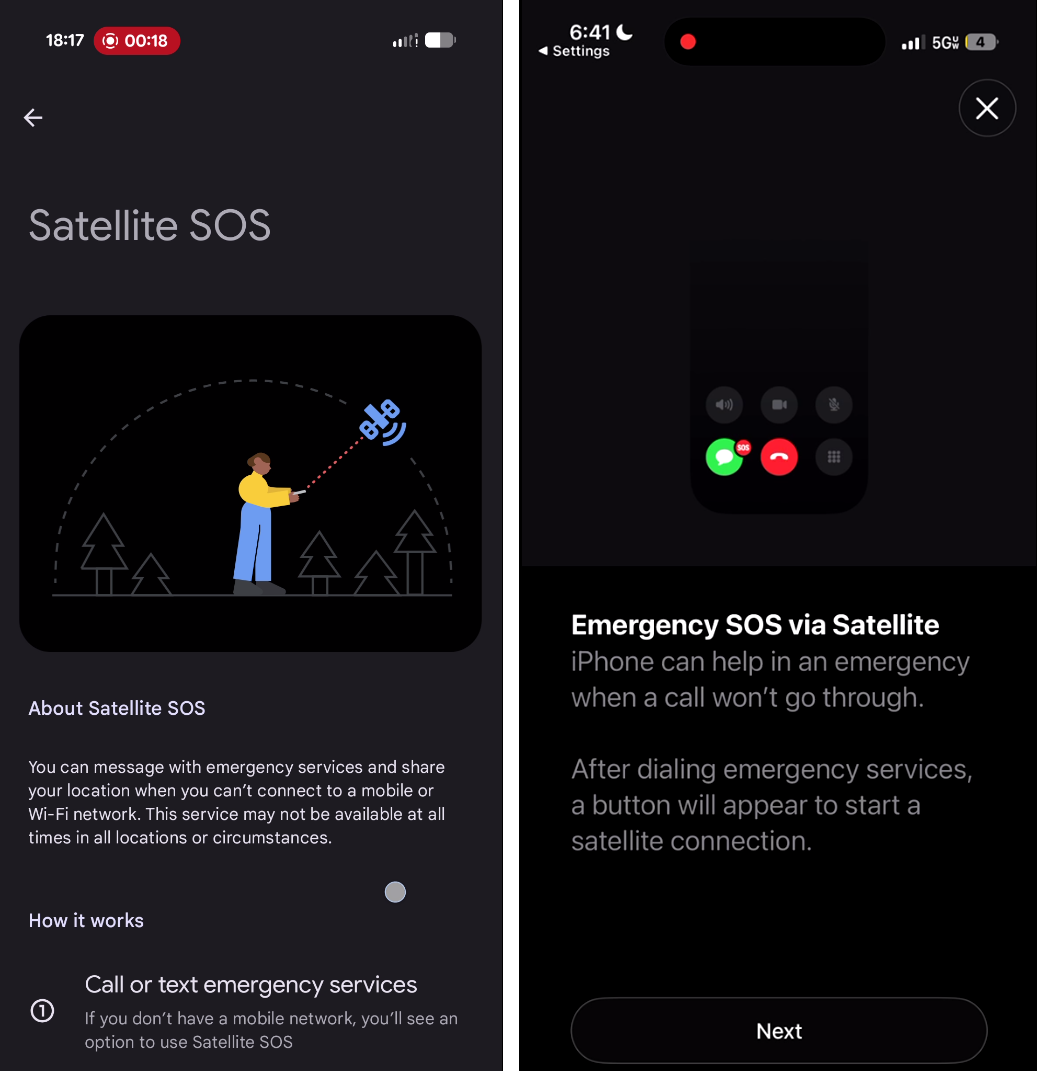 Both phones let you practice the whole thing at home, no real call involved. Do it once.
Set it up before you go
Update your phone to the latest software before the trip, since these features improve and expand often. Then fill in your medical information and emergency contacts, because the phone shares them automatically when you send for help. On an iPhone that lives in the Health app under Medical ID. On a Pixel it is under Safety & Emergency.
Next, run the demo. Both phones include a practice mode that walks you through aiming at a satellite without contacting anyone. Do it once at home and you will recognize every screen when it counts. On an iPhone, open Settings, then Apps, then Messages, then Satellite Connection Demo. On a Pixel, open Settings, then Safety & Emergency, then Satellite SOS. This is the single best thing you can do to be ready, and almost nobody does it.
On an iPhone
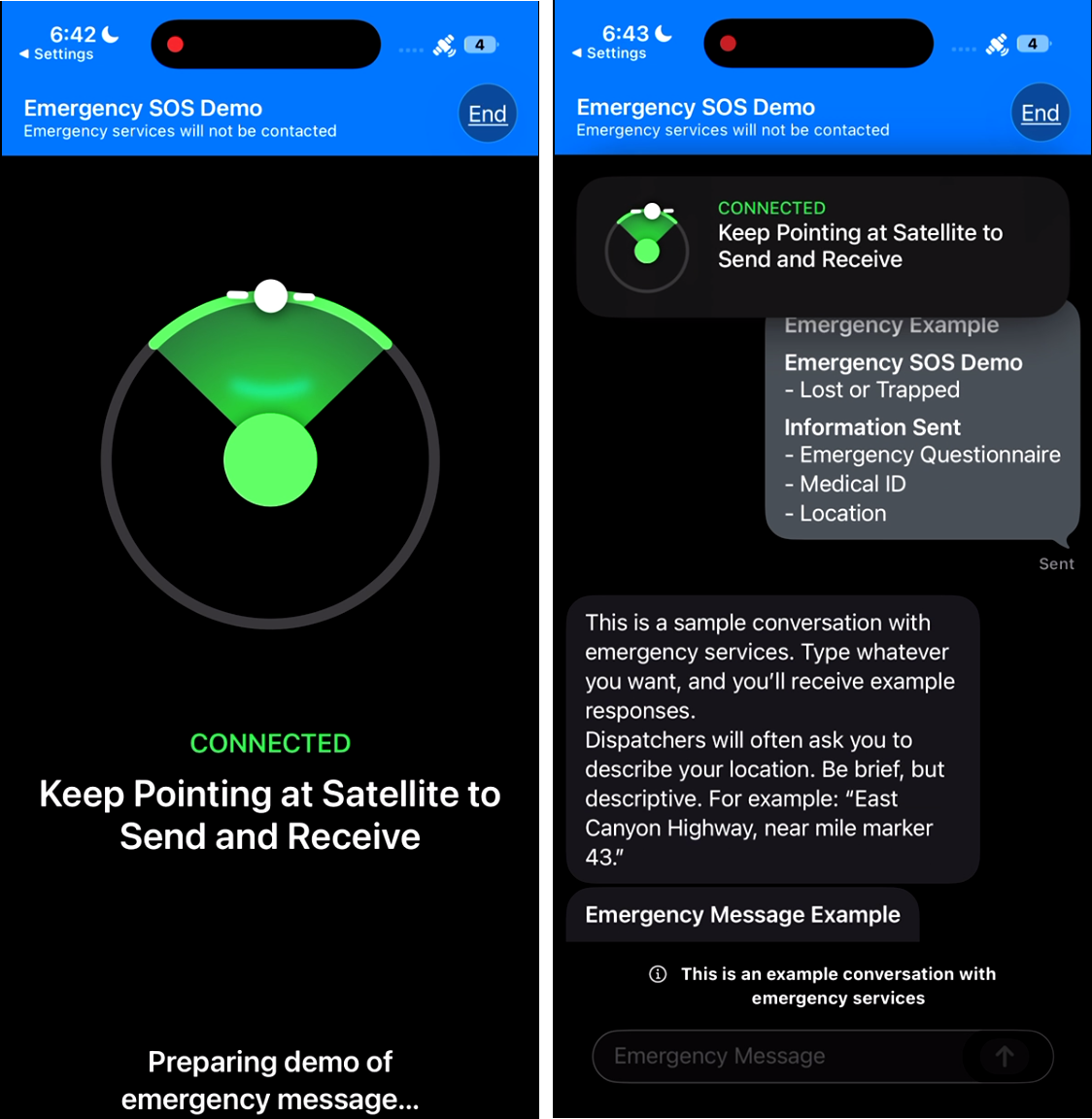
When a call to emergency services will not connect because you're off the grid, your iPhone offers to text them by satellite instead. You can also reach it from the Satellite option that appears when you have no coverage, or by typing "SOS" into the Messages address field. Answer the short questionnaire about what's wrong and who's affected, choose whether to alert your emergency contacts, then follow the arrows on screen to point the phone at the satellite and hold it there while the message goes out.
Outside of an emergency and in supported regions, you open Messages or Find My the same way to text someone or share where you are.
On a Pixel
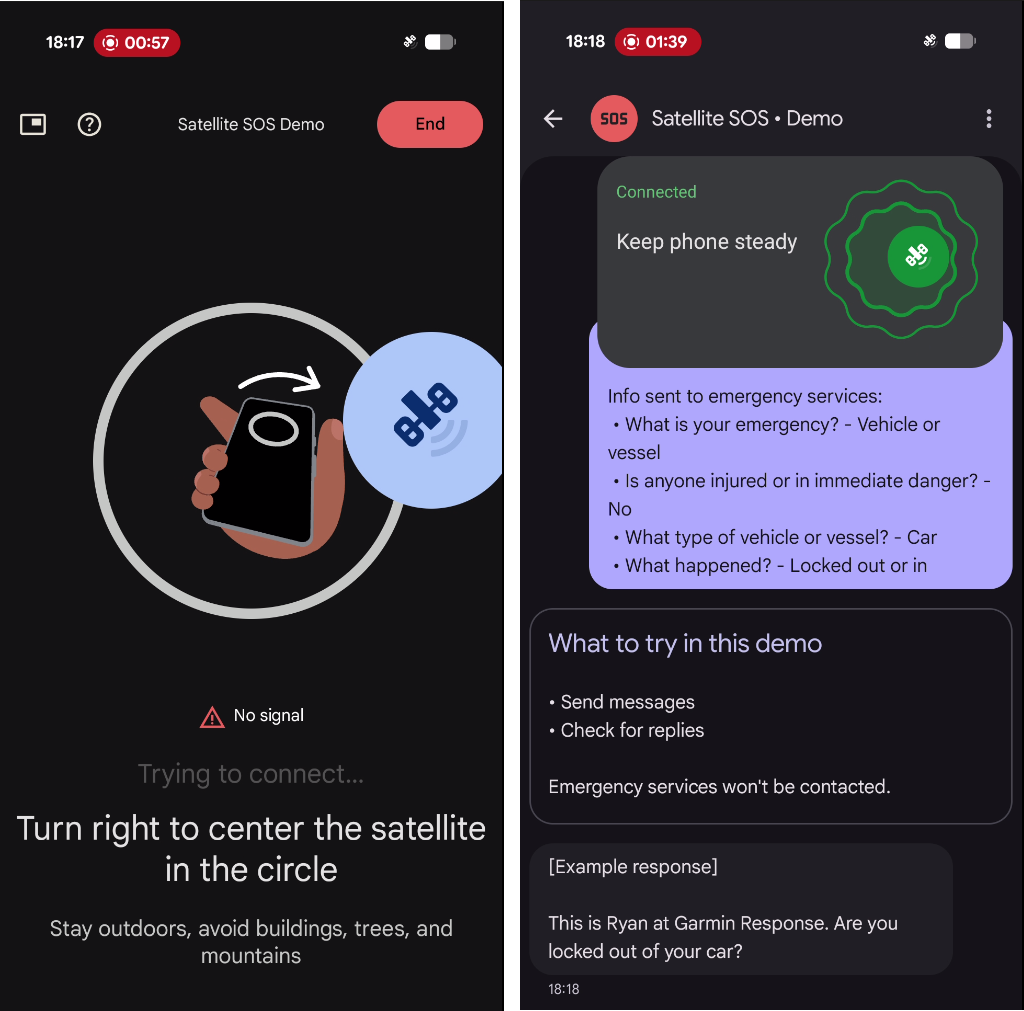
When you have no mobile or Wi-Fi signal, a Satellite SOS option appears in the Phone app's dialer. Tap it and start. Fill out the emergency questionnaire, choose whether to notify your emergency contacts, then follow the prompts to position the phone. A responder should reply within a few minutes, so stay outside with a clear view of the sky to receive it. One catch worth knowing: the feature needs Google Messages set as your default messaging app, or it turns off.
What it feels like in the field
Get into the open. You need a clear view of the sky and the horizon, away from trees, canyon walls, and buildings. Heavy foliage can block the connection entirely, and if it does, you have to move to a clearer spot.
Aiming is active, not automatic. The screen guides you to point the phone and slowly track the satellite as it moves, and you hold it steady while the message sends. It's slow by design. A message can take around 30 seconds under a clear sky and longer under light tree cover, so keep the phone pointed and be patient.
Watch your battery. Once you're off the grid, the phone is your only link, and cold drains it fast. Turn down the screen, close what you're not using, and treat the remaining charge like the resource it is.
A safety net, not a safety system
Here is the part we will not soften. Phone satellite messaging is a genuine advance, and you should absolutely set it up. But it leans on a stack of things all going right at once: a phone that still works, a charge to spare, a conscious person to operate it, a clear view of the sky, and the time and steadiness to aim. Take any one of those away and it does nothing.
An experienced reviewer who tests this gear put it bluntly: on phones and watches, the satellite SOS process is so dependent on conditions that it can amount to a false sense of security. Better than nothing, but not a true emergency system. A dedicated satellite messenger like a Garmin inReach is built around a single physical SOS button that reaches a staffed monitoring center, so an injured person can trigger it without fighting to acquire a signal first.
That is the real difference. Dedicated devices add a hardware SOS button to a 24/7 response team, two-way messaging that holds a conversation, live tracking the people at home can actually watch, rugged bodies, and batteries that last for days. They are built for the backcountry. Your phone is adapted to it.
One more thing to keep in mind. The satellite features are free for two years after you activate the phone. Apple has extended that window more than once for older iPhones, and Google has not said what happens when its two years are up. Useful to know, but not something to build a long-term safety plan around.
So set up your phone's satellite features and learn to use them, because the best emergency tool is the one you actually have on you. If your trips are short, close to known areas, and rarely solo, that baseline may be all you need. But if you go further out into the backcountry, a device designed for the job earns its place in your pack. We will cover those in detail in our next blog post: from dedicated messengers to personal locator beacons, and how to choose between them.
Set it up, then go
Whatever you carry, it works best as one piece of a plan rather than the whole plan. A satellite SOS reaches the responders who come find you. A satellite check-in reaches the people at home who notice you are overdue and make the call. Both land better when someone already knows where you went and when to start worrying, which is exactly what a trip portfolio is for.
Set it up tonight and run the demo once. Then stop thinking of it as a magic button and start seeing it for what it is: a good backup, on the phone you were already carrying.
References
The specifics in this post come from these public sources. Device support and pricing change often, so check the official pages before relying on any detail.
- Apple, "Use Emergency SOS via satellite on your iPhone." https://support.apple.com/en-us/101573
- Apple, "Connect to a satellite with your iPhone" (satellite features and connection behavior). https://support.apple.com/en-us/105097
- Apple, "About Messages via satellite on your iPhone." https://support.apple.com/en-us/120930
- Google, "Get emergency help through satellite with your Pixel phone." https://support.google.com/pixelphone/answer/15254448
- Free-period and supported models, context: PhoneArena, "Apple iPhone's Emergency SOS via Satellite" coverage (2026), and Techlicious, "All the phones that have satellite messaging in 2026."
- Real-world rescue: PhoneArena, "Apple iPhone's Emergency SOS via Satellite saves six caught in an avalanche."
- Limitations and the dedicated-device comparison: DC Rainmaker, coverage of phone and watch satellite SOS (2026).